This is the introduction to a series of articles where we will see how to create a Docker-based web application.
This application will use the following technologies:
The goal of the series is not the web application itself, but rather configuring all of the pieces in Docker. The application we will develop will be a simple todo list.
The last article in the series will be dedicated to deploying this application on DigitalOcean with HTTPS enabled.
The series will be divided as follows:
- Part 1: Introduction
- Part 2: Configuring Parse Server / MongoDB
- Part 3: Configuring Parse Dashboard
- Part 4: Creating the Next application
- Part 5: Configuring Next
- Part 6: Configuring NGINX / Let's Encrypt and deployment
Before we begin:
In this project, the domain used will be example.com and all folders and files will be located in a main folder named docker-web-app. You can change this folder if you want. Remember to replace example.com with your own domain.
Container architecture:
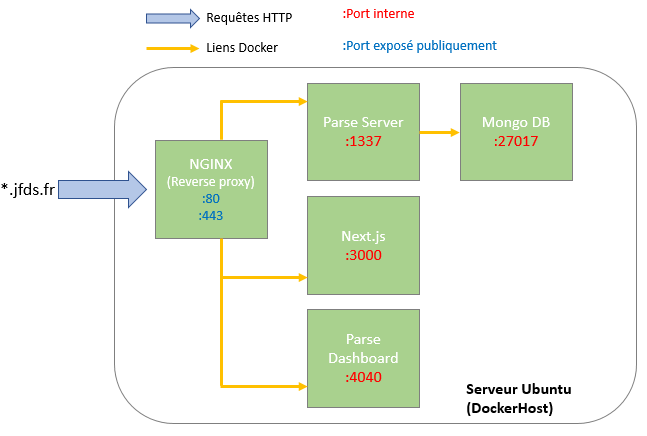
As you can see in the diagram above, our project will be made up of 5 containers. First, an NGINX container will act as a reverse proxy and redirect the domains below to the corresponding services:
- api.example.com => Parse Server
- dashboard.example.com => Parse Dashboard
- example.com => Next.js
The NGINX container will be linked to these three containers:
- Parse Server
- Parse Dashboard
- Next.js
Finally, we have a MongoDB container that will be linked to the Parse Server container and will contain the project's database.
Some of these containers will have volumes, but we will look at that case by case while configuring each container.
The series presentation is now complete.
Series navigation
- Build a web application with Docker, Parse, and Next.js - Part 1: Introduction
- Build a web application with Docker, Parse, and Next.js - Part 2: Configuring Parse Server / MongoDB
- Build a web application with Docker, Parse, and Next.js - Part 3: Configuring Parse Dashboard
- Build a web application with Docker, Parse, and Next.js - Part 4: Creating the Next application
- Build a web application with Docker, Parse, and Next.js - Part 5: Next.js & Docker
- Build a web application with Docker, Parse, and Next.js - Part 6: DigitalOcean deployment